> ## Documentation Index
> Fetch the complete documentation index at: https://wb-21fd5541-docs-hivemind-launch.mintlify.site/llms.txt
> Use this file to discover all available pages before exploring further.
# Calls 쿼리 및 내보내기
> Python SDK, REST API 또는 Weave UI를 사용해 Weave call 데이터를 필터링, 정렬하고 내보내 맞춤형 분석에 활용합니다.
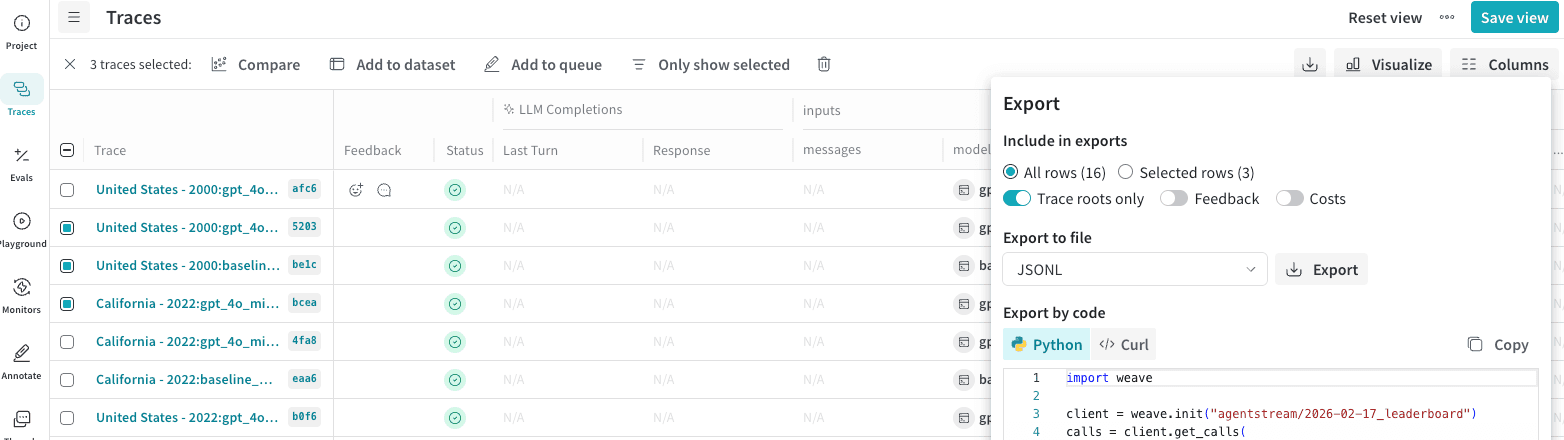
Weave UI에서는 데이터를 여러 형식으로 내보낼 수 있습니다. 또한 행을 프로그래밍 방식으로 내보낼 때 사용할 수 있는 Python 및 cURL 코드도 표시됩니다.
Calls를 내보내려면 다음 단계를 따르세요.
1. [wandb.ai](https://wandb.ai/)로 이동한 다음 프로젝트를 선택합니다.
2. Weave 프로젝트 사이드바에서 **Traces**를 클릭합니다.
3. 내보내려는 여러 Calls의 행을 체크해 선택합니다.
4. **Traces** 테이블 툴바에서 내보내기/다운로드 버튼을 클릭합니다.
5. **Export** 모달에서 **Selected rows** 또는 **All rows**를 선택한 다음 Export를 클릭합니다.
## 프로그래밍 방식으로 call 조회하기
Python API를 사용해 call을 조회하려면 [`client.get_calls`](/ko/weave/reference/python-sdk/trace/weave_client#method-get_calls) 메서드를 사용할 수 있습니다.
```python lines theme={null}
import weave
# 클라이언트 초기화
client = weave.init("your-project-name")
# call 조회
calls = client.get_calls(filter=...)
```
TypeScript API를 사용해 call을 조회하려면 [`client.getCalls`](/ko/weave/reference/typescript-sdk/classes/weaveclient#getcalls) 메서드를 사용할 수 있습니다.
```typescript lines theme={null}
import * as weave from 'weave'
// 클라이언트 초기화
const client = await weave.init('intro-example')
// call 조회
const calls = await client.getCalls(filter=...)
```
가장 강력한 쿼리 계층은 Service API에 있습니다. Service API를 사용해 call을 조회하려면 [`/calls/stream_query`](https://docs.wandb.ai/weave/reference/service-api/calls/calls-query-stream) 엔드포인트로 요청을 보낼 수 있습니다.
```bash theme={null}
curl -L 'https://trace.wandb.ai/calls/stream_query' \
-H 'Content-Type: application/json' \
-H 'Accept: application/json' \
-d '{
"project_id": "string",
"filter": {
"op_names": [
"string"
],
"input_refs": [
"string"
],
"output_refs": [
"string"
],
"parent_ids": [
"string"
],
"trace_ids": [
"string"
],
"call_ids": [
"string"
],
"trace_roots_only": true,
"wb_user_ids": [
"string"
],
"wb_run_ids": [
"string"
]
},
"limit": 100,
"offset": 0,
"sort_by": [
{
"field": "string",
"direction": "asc"
}
],
"query": {
"$expr": {}
},
"include_costs": true,
"include_feedback": true,
"columns": [
"string"
],
"expand_columns": [
"string"
]
}'
```
call 속성과 필드에 대한 전체 내용은 [Call 스키마 레퍼런스](/ko/weave/guides/tracking/call-schema-reference)를 참조하세요.
## Call 메트릭 내보내기
Weave Service API의 [POST `/calls/stats` 엔드포인트](https://docs.wandb.ai/weave/reference/service-api/calls/call-stats)를 사용하면 Call 데이터 자체를 조회하지 않고도 Calls에 대한 메트릭을 조회할 수 있습니다. 이를 통해 지연 시간이나 비용 같은 Calls 관련 정보를 빠르고 효율적으로 조회하고, 이를 합계, 평균, 최솟값, 최댓값, 개수 기준으로 집계할 수 있습니다. 예를 들어 다음을 조회할 수 있습니다:
* 총 토큰 사용량
* 평균 지연 시간
* 사용된 최대 토큰 수
* 총 비용
* 최소 입력 토큰 수
이 엔드포인트는 지정된 기간 내에 발생한 Calls를 대상으로 하고, 다음과 같은 다른 속성을 기준으로 필터링할 수 있는 여러 옵션을 제공합니다:
* Op 이름
* Trace ID
* Thread ID
* 사용자 ID
다음 예제는 `web_app`이라는 이름의 Op에서 생성된 Calls를 2일 동안 조회하는 방법을 보여줍니다:
```python Python lines {10-11,16-24} theme={null}
import requests
import json
import os
url = "https://trace.wandb.ai/calls/stats"
payload = {
"project_id": "",
"start": "2026-03-01T00:00:00Z",
# 버킷 크기를 초 단위로 지정합니다.
"granularity": 86400,
"filter": {
"trace_roots_only": True,
"op_names": ["web_app"]
},
# 메트릭과 해당 집계 함수를 지정합니다.
"usage_metrics": [
{"metric": "total_tokens", "aggregations": ["sum"]},
{"metric": "total_cost", "aggregations": ["sum"]}
],
"call_metrics": [
{"metric": "call_count", "aggregations": ["sum"]},
{"metric": "error_count", "aggregations": ["sum"]},
{"metric": "latency_ms", "aggregations": ["avg", "min", "max"], "percentiles": [50, 95, 99]}
]
}
API_KEY = os.getenv("WANDB_API_KEY")
response = requests.post(url, json=payload, auth=("api", API_KEY))
print(json.dumps(response.json(), indent=2))
```
```typescript TypeScript lines {6-7,13-20} theme={null}
const url = "https://trace.wandb.ai/calls/stats";
const payload = {
project_id: "",
start: "2026-03-01T00:00:00Z",
// 버킷 크기를 초 단위로 지정합니다.
granularity: 86400,
filter: {
trace_roots_only: true,
op_names: ["web_app"],
},
// 메트릭과 해당 집계 함수를 지정합니다.
usage_metrics: [
{ metric: "total_tokens", aggregations: ["sum"] },
{ metric: "total_cost", aggregations: ["sum"] },
],
call_metrics: [
{ metric: "call_count", aggregations: ["sum"] },
{ metric: "error_count", aggregations: ["sum"] },
{ metric: "latency_ms", aggregations: ["avg", "min", "max"], percentiles: [50, 95, 99] },
],
};
const API_KEY = process.env.WANDB_API_KEY!;
const response = await fetch(url, {
method: "POST",
headers: {
"Content-Type": "application/json",
Authorization: "Basic " + btoa(`api:${API_KEY}`),
},
body: JSON.stringify(payload),
});
const data = await response.json();
console.log(JSON.stringify(data, null, 2));
```
이 요청은 메트릭을 어떤 방식으로 집계할지도 지정합니다. 메트릭은 `sum`, `count`, `avg`, `min`, `max`, `count` 기준으로 집계할 수 있습니다.
이 엔드포인트는 JSON 객체를 반환합니다. 다음 응답 예제는 2일치 메트릭을 보여줍니다. 각 날짜(버킷)는 `usage_buckets` 및 `call_buckets` 배열에서 각각 별도의 객체로 나뉩니다. 각 배열은 메트릭을 서로 다른 방식으로 분류합니다:
* `usage_buckets`: 사용된 모델을 기준으로 각 날짜의 Call 메트릭을 그룹화합니다.
* `call_buckets`: 사용된 모델과 관계없이 각 날짜의 Call 메트릭을 그룹화합니다.
요청에서 granularity 필드(초 단위)를 설정해 버킷 크기를 변경합니다.
```json lines theme={null}
{
"start": "2026-03-03T00:00:00Z",
"end": "2026-03-04T21:34:39.746539Z",
"granularity": 86400,
"timezone": "UTC",
"usage_buckets": [
{
"timestamp": "2026-03-03T00:00:00",
"model": "gpt-4o-2024-08-06",
"sum_total_tokens": 498.0,
"sum_input_tokens": 219.0,
"sum_output_tokens": 279.0,
"count": 5,
"sum_total_cost": 0.0033374999156876584
},
{
"timestamp": "2026-03-03T00:00:00",
"model": "gpt-5-2025-08-07",
"sum_total_tokens": 0.0,
"sum_input_tokens": 0.0,
"sum_output_tokens": 0.0,
"count": 0,
"sum_total_cost": 0.0
},
{
"timestamp": "2026-03-04T00:00:00",
"model": "gpt-4o-2024-08-06",
"sum_total_tokens": 58.0,
"sum_input_tokens": 27.0,
"sum_output_tokens": 31.0,
"count": 1,
"sum_total_cost": 0.0003774999904635479
},
{
"timestamp": "2026-03-04T00:00:00",
"model": "gpt-5-2025-08-07",
"sum_total_tokens": 427.0,
"sum_input_tokens": 26.0,
"sum_output_tokens": 401.0,
"count": 1,
"sum_total_cost": 0.00404249989787786
}
],
"call_buckets": [
{
"timestamp": "2026-03-03T00:00:00",
"sum_call_count": 6,
"sum_error_count": 1,
"avg_latency_ms": 1505.6666666666667,
"min_latency_ms": 525,
"max_latency_ms": 2524,
"p50_latency_ms": 1534.0,
"p95_latency_ms": 2328.5,
"p99_latency_ms": 2484.9000000000005,
"count": 6
},
{
"timestamp": "2026-03-04T00:00:00",
"sum_call_count": 2,
"sum_error_count": 0,
"avg_latency_ms": 3645.0,
"min_latency_ms": 1739,
"max_latency_ms": 5551,
"p50_latency_ms": 3645.0,
"p95_latency_ms": 5360.4,
"p99_latency_ms": 5512.88,
"count": 2
}
]
}
```
최대 31일 범위의 메트릭을 쿼리할 수 있습니다. 자세한 내용과 사용 가능한 옵션은 [Service API 레퍼런스](https://docs.wandb.ai/weave/reference/service-api/calls/call-stats)를 참조하세요.