> ## Documentation Index
> Fetch the complete documentation index at: https://wb-21fd5541-docs-hivemind-launch.mintlify.site/llms.txt
> Use this file to discover all available pages before exploring further.
# Ops 사용자 지정
> 가시성을 높이도록 Ops에 색상을 지정하는 방법, 로깅할 항목을 변경하는 방법, 샘플링 비율을 제어하는 방법을 알아보세요
Weave Op는 모든 calls를 자동으로 로깅하는, 버전이 관리되는 함수입니다.
Op를 만들려면 Python 함수에 `weave.op()` 데코레이터를 적용하세요
```python lines theme={null}
import weave
@weave.op()
def track_me(v):
return v + 5
weave.init('intro-example')
track_me(15)
```
Op를 call하면, 마지막 call 이후 코드가 변경된 경우 새 Op 버전이 생성되며 함수의 입력과 출력을 로깅합니다.
`@weave.op()`로 데코레이션한 함수는 call 전에 `weave.init('your-project-name')`를 실행하지 않으면 일반 함수처럼 동작합니다(코드 버전 관리 및 추적 없음).
Ops는 Weave toolbelt를 사용해 [서빙](/ko/weave/guides/tools/serve)하거나 [배포](/ko/weave/guides/tools/deploy)할 수 있습니다.
Op를 만들려면 TypeScript 함수를 `weave.op`으로 감싸세요
```typescript lines theme={null}
import * as weave from 'weave'
function trackMe(v: number) {
return v + 5
}
const trackMeOp = weave.op(trackMe)
trackMeOp(15)
// 인라인으로도 이렇게 할 수 있으며, 더 편리할 수 있습니다
const trackMeInline = weave.op((v: number) => v + 5)
trackMeInline(15)
```
## 표시 이름 사용자 지정
`@weave.op` 데코레이터의 `name` 매개변수를 설정해 Op의 표시 이름을 사용자 지정할 수 있습니다:
```python lines theme={null}
@weave.op(name="custom_name")
def func():
...
```
```plaintext theme={null}
이 기능은 아직 TypeScript에서 사용할 수 없습니다.
```
## kind 및 색상 적용
Weave UI에서 Ops를 더 잘 구성하려면 코드의 `@weave.op` 데코레이터에 `kind` 및 `color` 인수를 추가해 사용자 지정 kind와 색상을 적용할 수 있습니다. 예를 들어, 다음 코드는 상위 함수에 `LLM` `kind`와 `blue` `color`를 적용하고, 중첩 함수에 `tool` `kind`와 `red` `color`를 적용합니다.
```python lines theme={null}
import weave
weave.init("/")
@weave.op(kind="LLM", color="blue")
def llm_func():
@weave.op(kind="tool", color="red")
def tool_func():
return "tool result"
tool_result = tool_func()
return f"llm result with {tool_result}"
llm_func()
```
```plaintext theme={null}
이 기능은 아직 TypeScript에서 사용할 수 없습니다.
```
이렇게 하면 Weave UI의 Ops에 다음과 같이 색상과 kind가 적용됩니다.
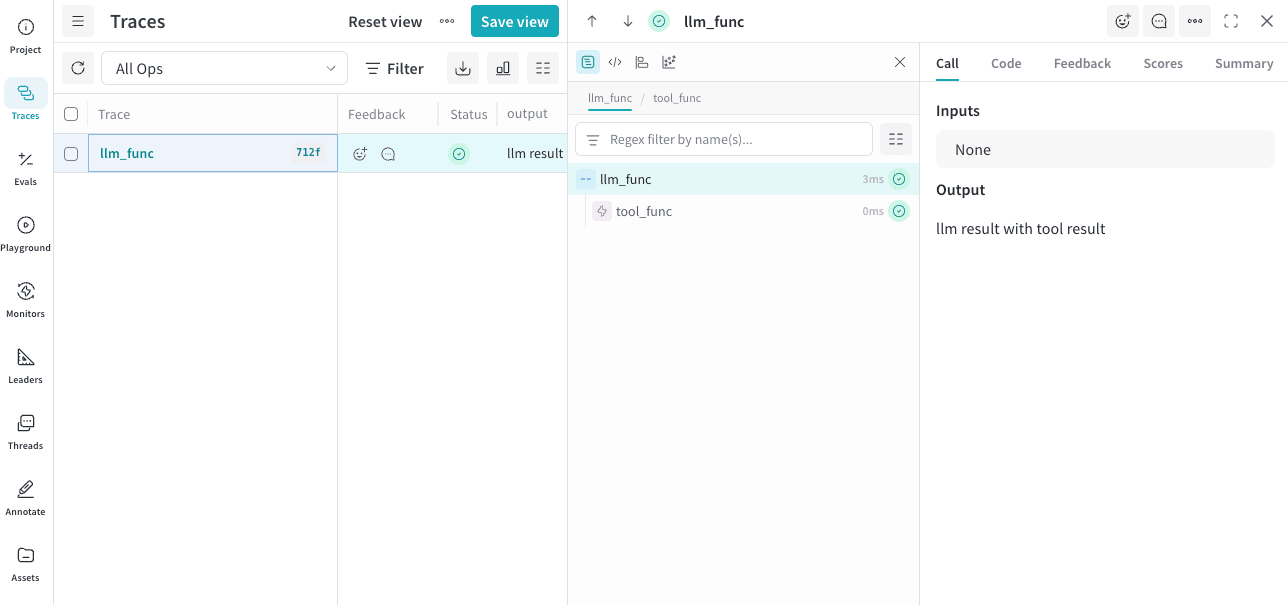 사용 가능한 `kind` 값은 다음과 같습니다.
* `agent`
* `llm`
* `tool`
* `search`
사용 가능한 `color` 값은 다음과 같습니다.
* `red`
* `orange`
* `yellow`
* `green`
* `blue`
* `purple`
사용 가능한 `kind` 값은 다음과 같습니다.
* `agent`
* `llm`
* `tool`
* `search`
사용 가능한 `color` 값은 다음과 같습니다.
* `red`
* `orange`
* `yellow`
* `green`
* `blue`
* `purple`
## 로깅된 입력과 출력을 사용자 지정하기
원래 함수를 수정하지 않고 Weave가 로깅하는 데이터를 변경하고 싶다면(예: 민감한 데이터를 숨기기 위해) Op 데코레이터에 `postprocess_inputs`와 `postprocess_output`을 전달할 수 있습니다.
`postprocess_inputs`는 키가 인수 이름이고 값이 인수 값인 dict를 받아, 변환된 입력이 담긴 dict를 반환합니다.
`postprocess_output`은 함수가 일반적으로 반환하는 임의의 값을 받아, 변환된 출력을 반환합니다.
```python lines theme={null}
from dataclasses import dataclass
from typing import Any
import weave
@dataclass
class CustomObject:
x: int
secret_password: str
def postprocess_inputs(inputs: dict[str, Any]) -> dict[str, Any]:
return {k:v for k,v in inputs.items() if k != "hide_me"}
def postprocess_output(output: CustomObject) -> CustomObject:
return CustomObject(x=output.x, secret_password="REDACTED")
@weave.op(
postprocess_inputs=postprocess_inputs,
postprocess_output=postprocess_output,
)
def func(a: int, hide_me: str) -> CustomObject:
return CustomObject(x=a, secret_password=hide_me)
weave.init('hide-data-example') # 🐝
func(a=1, hide_me="password123")
```
```plaintext theme={null}
이 기능은 아직 TypeScript에서 사용할 수 없습니다.
```
## 샘플링 비율 제어
`@weave.op` 데코레이터에서 `tracing_sample_rate` 매개변수를 설정하면 Op call이 얼마나 자주 트레이스될지 제어할 수 있습니다. 이는 호출 빈도가 높은 Op에서 일부 calls만 트레이스하면 될 때 유용합니다.
에이전트 개발 중에는 에이전트의 동작을 더 잘 형성하고 이해하는 데 도움이 되도록 모든 트레이스를 수집하는 것을 권장하지만, 프로덕션에서는 trace sampling을 구성하여 에이전트 동작에 대한 가시성을 유지하면서도 비용을 낮추는 것을 권장합니다.
Weave는 샘플링 비율을 가장 바깥쪽 Op에만 적용합니다. 중첩된 Op에 샘플링 비율이 설정되어 있더라도 상위 Op가 먼저 이를 호출하면 중첩된 Op의 샘플링 비율은 무시됩니다.
```python lines theme={null}
@weave.op(tracing_sample_rate=0.1) # calls의 약 10%만 트레이스
def high_frequency_op(x: int) -> int:
return x + 1
@weave.op(tracing_sample_rate=1.0) # 항상 트레이스(기본값)
def always_traced_op(x: int) -> int:
return x + 1
```
Op의 call이 샘플링되지 않으면:
* 함수는 정상적으로 실행됩니다
* 트레이스 데이터가 Weave로 전송되지 않습니다
* 해당 call에 대해서는 하위 Op도 트레이스되지 않습니다
샘플링 비율은 0.0 이상 1.0 이하여야 합니다.
```plaintext theme={null}
이 기능은 아직 TypeScript에서 사용할 수 없습니다.
```
## call 링크 출력 제어
로깅하는 중에 call 링크가 출력되지 않게 하려면 `WEAVE_PRINT_CALL_LINK` 환경 변수를 `false`로 설정하면 됩니다. 이렇게 하면 출력량을 줄이고 로그가 덜 복잡해지도록 할 수 있습니다.
```bash lines theme={null}
export WEAVE_PRINT_CALL_LINK=false
```
## Op 삭제하기
Op 버전을 삭제하려면 Op ref에서 `.delete()`를 호출하세요.
```python lines theme={null}
weave.init('intro-example')
my_op_ref = weave.ref('track_me:v1')
my_op_ref.delete()
```
삭제된 Op에 접근하면 오류가 발생합니다.
```plaintext theme={null}
이 기능은 아직 TypeScript에서 사용할 수 없습니다.
```