> ## Documentation Index
> Fetch the complete documentation index at: https://wb-21fd5541-docs-hivemind-launch.mintlify.site/llms.txt
> Use this file to discover all available pages before exploring further.
# 코드 트레이스하기
> 실행 중인 코드를 계측해 실행 내용이 W&B Weave에 상세한 트레이스로 표시되도록 하세요.
실행 중인 코드를 Weave에서 상세한 트레이스로 보려면 Call를 생성해야 합니다. 이를 수행하는 주요 방법은 세 가지입니다:
## 1. LLM 라이브러리 call 자동 추적
Weave는 `openai`, `anthropic`, `cohere`, `mistral`, `LangChain`과 같은 여러 일반적인 인테그레이션 및 프레임워크와 자동으로 통합됩니다.
LLM 또는 프레임워크 라이브러리를 임포트하고 Weave 프로젝트를 초기화하면, 추가 코드 변경 없이도 Weave가 LLM 또는 플랫폼에 대한 모든 call을 자동으로 프로젝트에 트레이스합니다. 지원되는 라이브러리 인테그레이션의 전체 목록은 [Integrations Overview](/ko/weave/guides/integrations/)를 참조하세요.
```python lines theme={null}
import weave
from openai import OpenAI
client = OpenAI()
# Weave Tracing 초기화
weave.init('intro-example')
response = client.chat.completions.create(
model="gpt-4",
messages=[
{
"role": "user",
"content": "How are you?"
}
],
temperature=0.8,
max_tokens=64,
top_p=1,
)
```
```typescript lines theme={null}
import OpenAI from 'openai'
import * as weave from 'weave'
const client = new OpenAI()
// Weave Tracing 초기화
await weave.init('intro-example')
const response = await client.chat.completions.create({
model: 'gpt-4',
messages: [
{
role: 'user',
content: 'How are you?',
},
],
temperature: 0.8,
max_tokens: 64,
top_p: 1,
});
```
JS / TS 프로젝트의 전체 설정 가이드는 [TypeScript SDK: 서드파티 인테그레이션 가이드](/ko/weave/guides/integrations/js)를 참조하세요.
자동 동작을 더 세밀하게 제어하려면 [자동 LLM call 추적 구성](/ko/weave/guides/integrations/autopatching)을 참조하세요.
## 2. 맞춤형 함수 추적
LLM 애플리케이션에는 추적하고 싶은 추가 로직(예: 전처리/후처리, 프롬프트 등)이 있는 경우가 많습니다.
Weave를 사용하면 [`@weave.op`](/ko/weave/reference/python-sdk/#function-op) 데코레이터를 사용해 이러한 Call를 수동으로 추적할 수 있습니다. 예를 들면 다음과 같습니다.
```python lines theme={null}
import weave
# Weave Tracing 초기화
weave.init('intro-example')
# 함수에 데코레이터 적용
@weave.op
def my_function(name: str):
return f"Hello, {name}!"
# 함수 호출 -- Weave가 입력과 출력을 자동으로 추적합니다
print(my_function("World"))
```
[클래스의 메서드](#track-class-and-object-methods)도 추적할 수 있습니다.
Weave를 사용하면 [`weave.op`](/ko/weave/reference/typescript-sdk/functions/op)으로 함수를 래핑해 이러한 Call를 수동으로 추적할 수 있습니다. 예를 들면 다음과 같습니다.
```typescript lines theme={null}
import * as weave from 'weave'
await weave.init('intro-example')
function myFunction(name: string) {
return `Hello, ${name}!`
}
const myFunctionOp = weave.op(myFunction)
```
래핑을 인라인으로 정의할 수도 있습니다.
```typescript lines theme={null}
const myFunctionOp = weave.op((name: string) => `Hello, ${name}!`)
```
이는 함수와 클래스의 메서드 모두에 적용됩니다.
```typescript lines theme={null}
class MyClass {
constructor() {
this.myMethod = weave.op(this.myMethod)
}
myMethod(name: string) {
return `Hello, ${name}!`
}
}
```
### 클래스 및 객체 메서드 추적
클래스 및 객체 메서드도 추적할 수 있습니다. 메서드에 `weave.op` 데코레이터를 적용하면 클래스의 모든 메서드를 추적할 수 있습니다.
```python lines theme={null}
import weave
# Weave Tracing 초기화
weave.init("intro-example")
class MyClass:
# 메서드 데코레이트
@weave.op
def my_method(self, name: str):
return f"Hello, {name}!"
instance = MyClass()
# 메서드 호출 -- Weave가 입력과 출력을 자동으로 추적합니다
print(instance.my_method("World"))
```
**TypeScript에서 데코레이터 사용하기**
TypeScript 코드에서 `@weave.op` 데코레이터를 사용하려면 환경이 올바르게 설정되어 있는지 확인하세요.
* **TypeScript v5.0 이상**: 데코레이터가 기본적으로 지원되며 추가 설정이 필요하지 않습니다.
* **TypeScript v5.0 미만**: 데코레이터에 대한 실험적 지원을 활성화하세요. 자세한 내용은 [데코레이터에 대한 공식 TypeScript 문서](https://www.typescriptlang.org/docs/handbook/decorators.html)를 참조하세요.
트레이싱을 위해 인스턴스 메서드에 `@weave.op`을 적용할 수 있습니다.
```typescript lines theme={null}
class Foo {
@weave.op
async predict(prompt: string) {
return "bar"
}
}
```
클래스 내 유틸리티 함수를 모니터링하려면 정적 메서드에도 `@weave.op`을 적용할 수 있습니다.
```typescript lines theme={null}
class MathOps {
@weave.op
static square(n: number): number {
return n * n;
}
}
```
### 병렬(멀티스레드) 함수 call 트레이스
기본적으로 병렬로 실행된 Call은 Weave에서 각각 별도의 루트 Call로 표시됩니다. 동일한 부모 Op 아래에 올바르게 중첩되게 하려면 `ThreadPoolExecutor`를 사용하세요.
다음 코드 샘플은 [`ThreadPoolExecutor`](/ko/weave/reference/python-sdk/trace/util#class-contextawarethreadpoolexecutor)의 사용 예를 보여줍니다.
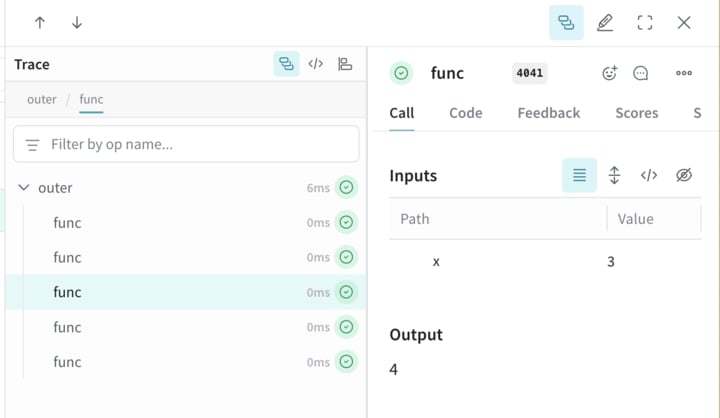
첫 번째 함수인 `func`는 `x`를 받아 `x+1`을 반환하는 단순한 Op입니다. 두 번째 함수인 `outer`는 입력 목록을 받는 또 다른 Op입니다.
`outer` 내부에서 `ThreadPoolExecutor`와 `exc.map(func, inputs)`를 사용하면 `func`에 대한 각 Call이 동일한 부모 트레이스 컨텍스트를 계속 유지합니다.
```python lines theme={null}
import weave
@weave.op
def func(x):
return x+1
@weave.op
def outer(inputs):
with weave.ThreadPoolExecutor() as exc:
exc.map(func, inputs)
# Update your Weave project name
client = weave.init('my-weave-project')
outer([1,2,3,4,5])
```
```plaintext theme={null}
이 기능은 아직 TypeScript SDK에서 사용할 수 없습니다.
```
Weave UI에서는 이렇게 하면 중첩된 하위 Call 다섯 개를 포함하는 단일 부모 Call이 생성되므로, 증가 연산이 병렬로 실행되더라도 완전한 계층형 트레이스를 얻을 수 있습니다.
## 3. 수동 Call 추적
API를 직접 사용해 Call을 수동으로 생성할 수도 있습니다.
```python lines theme={null}
import weave
# Weave Tracing 초기화
client = weave.init('intro-example')
def my_function(name: str):
# Call 시작
call = client.create_call(op="my_function", inputs={"name": name})
# ... 함수 코드 ...
# Call 종료
client.finish_call(call, output="Hello, World!")
# 함수 호출
print(my_function("World"))
```
```plaintext theme={null}
이 기능은 아직 TypeScript SDK에서 지원되지 않습니다.
```
* Call 시작: [POST `/call/start`](https://docs.wandb.ai/weave/reference/service-api/calls/call-start).
* Call 종료: [POST `/call/end`](https://docs.wandb.ai/weave/reference/service-api/calls/call-end).
```bash lines theme={null}
curl -L 'https://trace.wandb.ai/call/start' \
-H 'Content-Type: application/json' \
-H 'Accept: application/json' \
-d '{
"start": {
"project_id": "string",
"id": "string",
"op_name": "string",
"display_name": "string",
"trace_id": "string",
"parent_id": "string",
"started_at": "2024-09-08T20:07:34.849Z",
"attributes": {},
"inputs": {},
"wb_run_id": "string"
}
}
```