> ## Documentation Index
> Fetch the complete documentation index at: https://wb-21fd5541-docs-hivemind-launch.mintlify.site/llms.txt
> Use this file to discover all available pages before exploring further.
# Bedrock
> Weave를 사용해 Amazon Bedrock LLM 호출을 추적 및 모니터링하고, 파운데이션 모델 상호작용과 Converse API 사용 내역을 캡처합니다.
Weave는 선도적인 AI 회사들의 파운데이션 모델을 통합 API를 통해 제공하는 AWS의 완전 관리형 서비스인 Amazon Bedrock을 통해 수행되는 LLM 호출을 자동으로 추적하고 로그로 남깁니다.
Amazon Bedrock에서 Weave로 LLM 호출을 로그로 남길 수 있는 방법은 여러 가지가 있습니다. `weave.op`을 사용해 Bedrock 모델에 대한 모든 호출을 추적하기 위한 재사용 가능한 연산을 만들 수 있습니다. 선택적으로, Anthropic 모델을 사용하는 경우 Weave에 내장된 Anthropic 인테그레이션을 사용할 수 있습니다.
최신 튜토리얼은 [Amazon Web Services의 Weights & Biases](https://wandb.ai/site/partners/aws/)를 방문하세요.
## 트레이스
Weave는 Bedrock API 호출에 대한 트레이스를 자동으로 캡처합니다. Weave를 초기화하고 클라이언트를 패치한 다음에는 평소처럼 Bedrock 클라이언트를 사용할 수 있습니다.
```python lines theme={null}
import weave
import boto3
import json
from weave.integrations.bedrock.bedrock_sdk import patch_client
weave.init("my_bedrock_app")
# Bedrock 클라이언트 생성 및 패치
client = boto3.client("bedrock-runtime")
patch_client(client)
# 클라이언트를 평소와 같이 사용
response = client.invoke_model(
modelId="anthropic.claude-3-5-sonnet-20240620-v1:0",
body=json.dumps({
"anthropic_version": "bedrock-2023-05-31",
"max_tokens": 100,
"messages": [
{"role": "user", "content": "What is the capital of France?"}
]
}),
contentType='application/json',
accept='application/json'
)
response_dict = json.loads(response.get('body').read())
print(response_dict["content"][0]["text"])
```
`converse` API 사용 예:
```python lines theme={null}
messages = [{"role": "user", "content": [{"text": "What is the capital of France?"}]}]
response = client.converse(
modelId="anthropic.claude-3-5-sonnet-20240620-v1:0",
system=[{"text": "You are a helpful AI assistant."}],
messages=messages,
inferenceConfig={"maxTokens": 100},
)
print(response["output"]["message"]["content"][0]["text"])
```
## 직접 정의한 op로 래핑하기
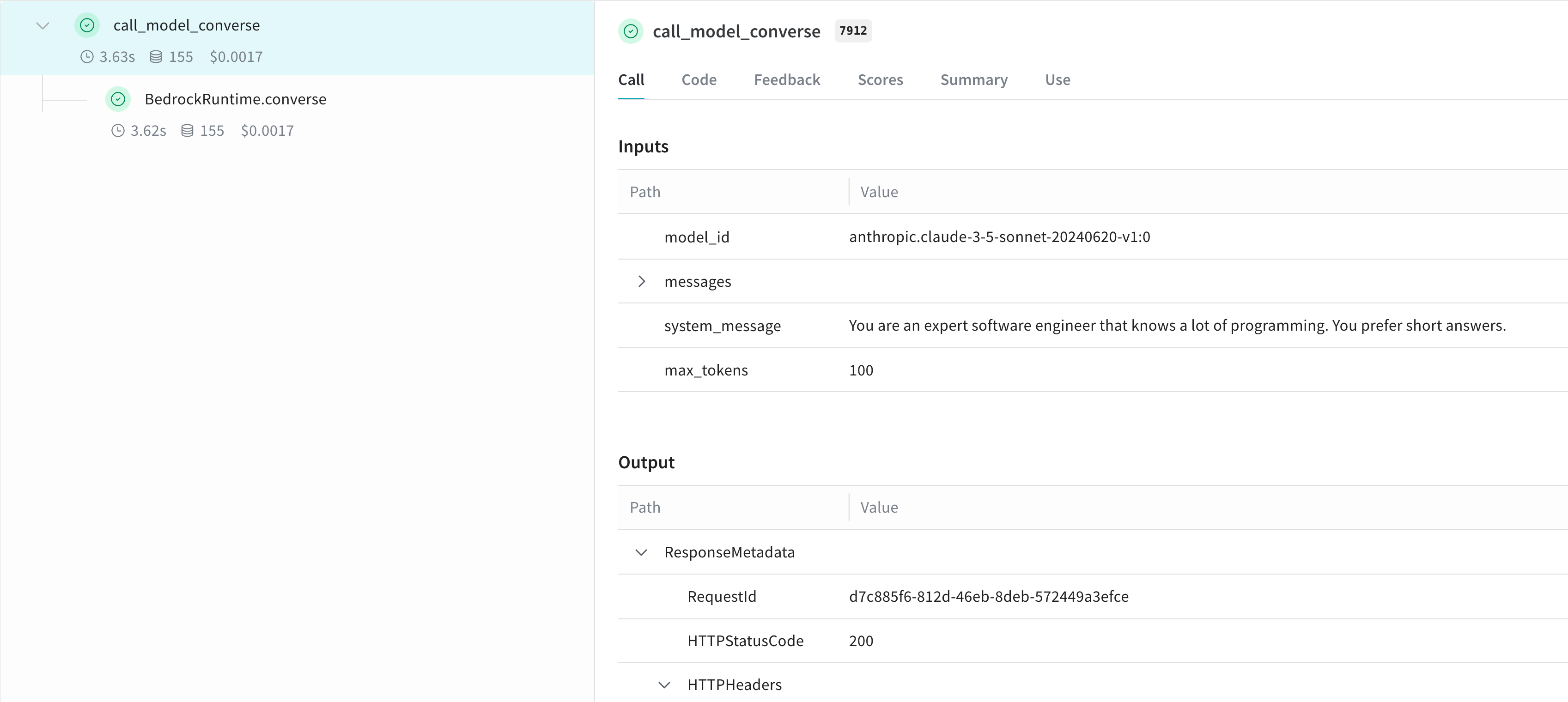
`@weave.op()` 데코레이터를 사용해서 재사용 가능한 연산을 만들 수 있습니다. 다음 예시는 `invoke_model`과 `converse` API를 모두 사용하는 방법을 보여 줍니다.
```python lines theme={null}
@weave.op
def call_model_invoke(
model_id: str,
prompt: str,
max_tokens: int = 100,
temperature: float = 0.7
) -> dict:
body = json.dumps({
"anthropic_version": "bedrock-2023-05-31",
"max_tokens": max_tokens,
"temperature": temperature,
"messages": [
{"role": "user", "content": prompt}
]
})
response = client.invoke_model(
modelId=model_id,
body=body,
contentType='application/json',
accept='application/json'
)
return json.loads(response.get('body').read())
@weave.op
def call_model_converse(
model_id: str,
messages: str,
system_message: str,
max_tokens: int = 100,
) -> dict:
response = client.converse(
modelId=model_id,
system=[{"text": system_message}],
messages=messages,
inferenceConfig={"maxTokens": max_tokens},
)
return response
```
## 더 쉬운 실험을 위해 `Model` 생성하기
Weave Model을 생성해 실험을 더 체계적으로 관리하고 파라미터를 기록할 수 있습니다. 다음은 `converse` API를 사용하는 예시입니다:
```python lines theme={null}
class BedrockLLM(weave.Model):
model_id: str
max_tokens: int = 100
system_message: str = "You are a helpful AI assistant."
@weave.op
def predict(self, prompt: str) -> str:
"Generate a response using Bedrock's converse API"
messages = [{
"role": "user",
"content": [{"text": prompt}]
}]
response = client.converse(
modelId=self.model_id,
system=[{"text": self.system_message}],
messages=messages,
inferenceConfig={"maxTokens": self.max_tokens},
)
return response["output"]["message"]["content"][0]["text"]
# 모델 생성 및 사용
model = BedrockLLM(
model_id="anthropic.claude-3-5-sonnet-20240620-v1:0",
max_tokens=100,
system_message="You are an expert software engineer that knows a lot of programming. You prefer short answers."
)
result = model.predict("What is the best way to handle errors in Python?")
print(result)
```
이 방식으로 Experiments를 버전 관리하고 Bedrock 기반 애플리케이션의 다양한 설정을 쉽게 추적할 수 있습니다.
## 더 알아보기
Weave와 함께 Amazon Bedrock을 활용하는 방법에 대해 자세히 알아보세요
### Weave Playground에서 Bedrock을 사용해 보기
별도 설정 없이 Weave UI에서 Amazon Bedrock 모델을 실험해 보고 싶으신가요? [LLM Playground](../tools/playground)를 사용해 보세요.
### 리포트: Weave로 Amazon Bedrock에서 텍스트 요약용 LLM 비교
[Evaluating LLMs on Amazon Bedrock](https://wandb.ai/byyoung3/ML_NEWS3/reports/Compare-LLMs-on-Amazon-Bedrock-for-text-summarization-with-W-B-Weave--VmlldzoxMDI1MTIzNw) 리포트는 Bedrock과 Weave를 함께 사용하여 텍스트 요약 작업을 위한 LLM을 평가하고 비교하는 방법을 코드 샘플과 함께 설명합니다.