> ## Documentation Index
> Fetch the complete documentation index at: https://wb-21fd5541-docs-hivemind-launch.mintlify.site/llms.txt
> Use this file to discover all available pages before exploring further.
# NVIDIA NIM
> ChatNVIDIA ライブラリを介して行われる LLM 呼び出しを Weave でトレースしてログする
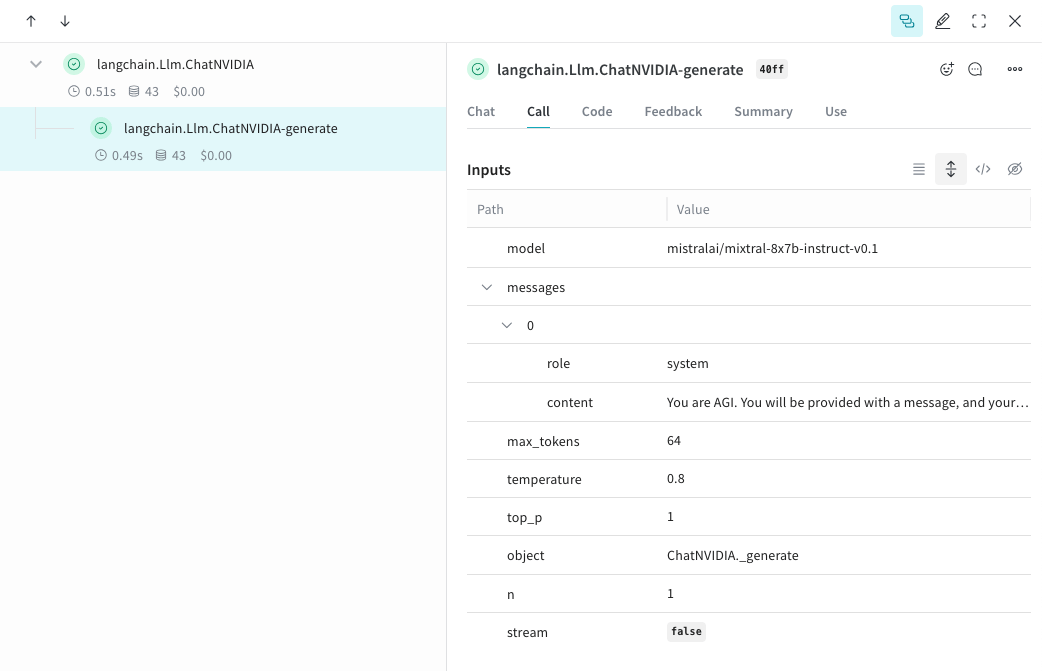
`weave.init()` が呼び出されると、Weave は [ChatNVIDIA](https://python.langchain.com/docs/integrations/chat/nvidia_ai_endpoints/) ライブラリを介して行われる LLM 呼び出しを自動的にトラッキングしてログします。
最新のチュートリアルについては、[Weights & Biases on NVIDIA](https://wandb.ai/site/partners/nvidia) をご覧ください。
## トレース
開発中と本番環境の両方で、LLM アプリケーションのトレースを中央のデータベースに保存することが重要です。これらのトレースは、デバッグに加えて、アプリケーションの改善時に評価に使う難しいケースのデータセットを構築する際にも役立ちます。
Weave は [ChatNVIDIA Python ライブラリ](https://python.langchain.com/docs/integrations/chat/nvidia_ai_endpoints/) のトレースを自動的にキャプチャできます。
任意のプロジェクト名を指定して `weave.init()` を呼び出すと、キャプチャを開始できます。
```python lines {4} theme={null}
from langchain_nvidia_ai_endpoints import ChatNVIDIA
import weave
client = ChatNVIDIA(model="mistralai/mixtral-8x7b-instruct-v0.1", temperature=0.8, max_tokens=64, top_p=1)
weave.init('emoji-bot')
messages=[
{
"role": "system",
"content": "You are AGI. You will be provided with a message, and your task is to respond using emojis only."
}]
response = client.invoke(messages)
```
```plaintext theme={null}
このライブラリは Python でのみ提供されているため、この機能はまだ TypeScript では利用できません。
```
## 独自の op をトラッキングする
関数を `@weave.op` でラップすると、入力、出力、アプリのロジックの記録が始まり、データがアプリ内をどのように流れるかをデバッグできるようになります。op は深くネストでき、トラッキングしたい関数のツリーを構築できます。また、実験を進める中でコードのバージョン管理も自動的に始まり、git にまだコミットしていないアドホックな詳細も記録できます。
[ChatNVIDIA Python ライブラリ](https://python.langchain.com/docs/integrations/chat/nvidia_ai_endpoints/) を呼び出す [`@weave.op`](/ja/weave/guides/tracking/ops) 付きの関数を作成するだけです。
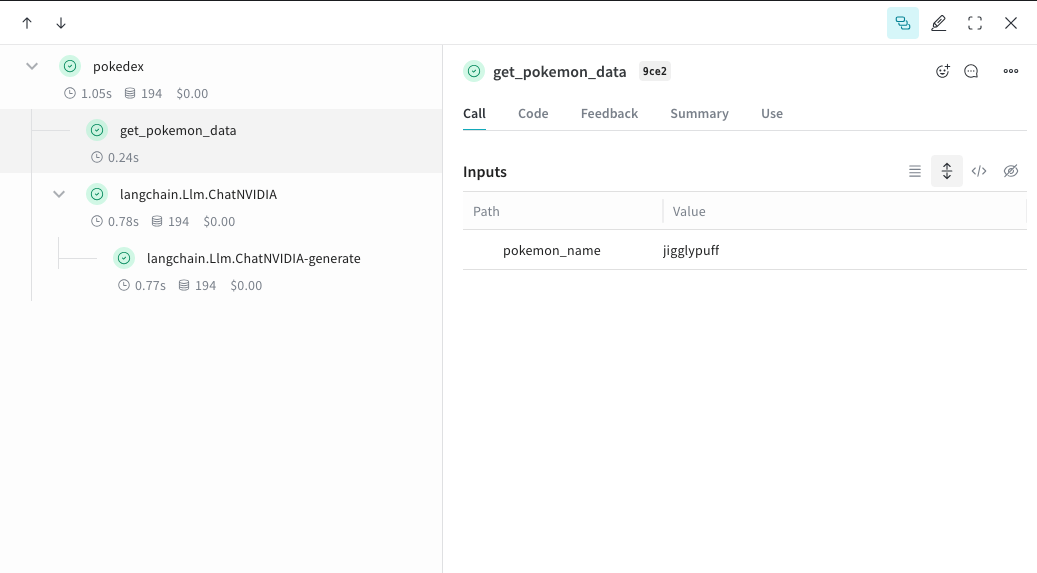
以下の例では、2 つの関数を op でラップしています。これにより、RAG アプリの検索 step のような中間 step が、アプリの挙動にどう影響しているかを確認しやすくなります。
```python lines {1,9,11,29,31,33} theme={null}
import weave
from langchain_nvidia_ai_endpoints import ChatNVIDIA
import requests, random
PROMPT="""Emulate the Pokedex from early Pokémon episodes. State the name of the Pokemon and then describe it.
Your tone is informative yet sassy, blending factual details with a touch of dry humor. Be concise, no more than 3 sentences. """
POKEMON = ['pikachu', 'charmander', 'squirtle', 'bulbasaur', 'jigglypuff', 'meowth', 'eevee']
client = ChatNVIDIA(model="mistralai/mixtral-8x7b-instruct-v0.1", temperature=0.7, max_tokens=100, top_p=1)
@weave.op
def get_pokemon_data(pokemon_name):
# これは、RAG アプリ内の検索 step のような、アプリケーション内の step です
url = f"https://pokeapi.co/api/v2/pokemon/{pokemon_name}"
response = requests.get(url)
if response.status_code == 200:
data = response.json()
name = data["name"]
types = [t["type"]["name"] for t in data["types"]]
species_url = data["species"]["url"]
species_response = requests.get(species_url)
evolved_from = "Unknown"
if species_response.status_code == 200:
species_data = species_response.json()
if species_data["evolves_from_species"]:
evolved_from = species_data["evolves_from_species"]["name"]
return {"name": name, "types": types, "evolved_from": evolved_from}
else:
return None
@weave.op
def pokedex(name: str, prompt: str) -> str:
# これは他の op を呼び出すルート op です
data = get_pokemon_data(name)
if not data: return "Error: Unable to fetch data"
messages=[
{"role": "system","content": prompt},
{"role": "user", "content": str(data)}
]
response = client.invoke(messages)
return response.content
weave.init('pokedex-nvidia')
# 特定の Pokémon のデータを取得する
pokemon_data = pokedex(random.choice(POKEMON), PROMPT)
```
Weave にアクセスすると、UI で `get_pokemon_data` をクリックして、その step の入力と出力を確認できます。
```plaintext theme={null}
この機能は、このライブラリが Python でのみ提供されているため、TypeScript ではまだ使用できません。
```
## より簡単に実験できるように `Model` を作成する
試行錯誤する要素が多いと、実験内容を整理するのは大変です。[`Model`](/ja/weave/guides/core-types/models) クラスを使用すると、system prompt や使用中のモデルなど、アプリの実験に関する詳細を記録して整理できます。これにより、アプリのさまざまな反復を整理し、比較しやすくなります。
[`Model`](/ja/weave/guides/core-types/models) は、コードのバージョン管理や入力/出力の記録に加えて、アプリケーションの動作を制御する構造化されたパラメーターも記録するため、どのパラメーターが最も効果的だったかを簡単に検索できます。また、Weave Models は `serve` や [`Evaluation`](/ja/weave/guides/core-types/evaluations) と組み合わせて使用することもできます。
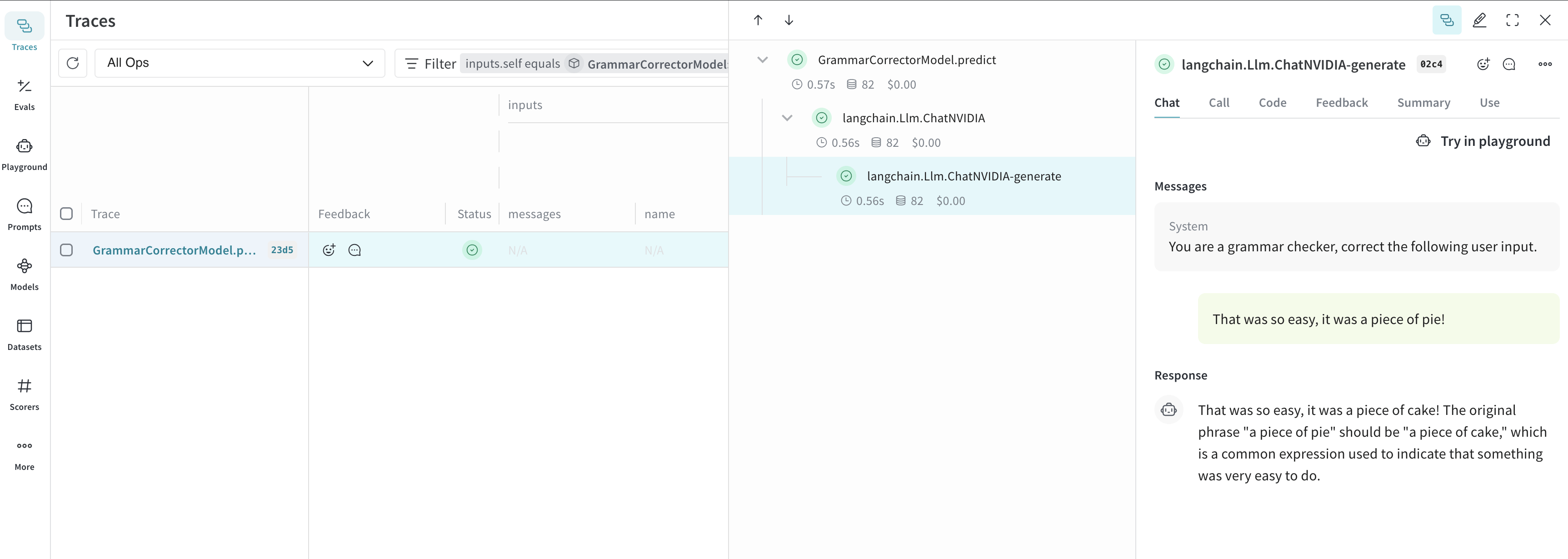
以下の例では、`model` と `system_message` を試せます。これらのいずれかを変更するたびに、`GrammarCorrectorModel` の新しい *version* が作成されます。
```python lines theme={null}
import weave
from langchain_nvidia_ai_endpoints import ChatNVIDIA
weave.init('grammar-nvidia')
class GrammarCorrectorModel(weave.Model): # `weave.Model` に変更
system_message: str
@weave.op()
def predict(self, user_input): # `predict` に変更
client = ChatNVIDIA(model="mistralai/mixtral-8x7b-instruct-v0.1", temperature=0, max_tokens=100, top_p=1)
messages=[
{
"role": "system",
"content": self.system_message
},
{
"role": "user",
"content": user_input
}
]
response = client.invoke(messages)
return response.content
corrector = GrammarCorrectorModel(
system_message = "You are a grammar checker, correct the following user input.")
result = corrector.predict("That was so easy, it was a piece of pie!")
print(result)
```
```plaintext theme={null}
この機能は、まだ TypeScript では利用できません。このライブラリは Python でしか提供されていないためです。
```
## 使用情報
ChatNVIDIA インテグレーションは、`invoke`、`stream`、およびそれらの非同期版をサポートしています。また、ツール使用もサポートしています。
ChatNVIDIA はさまざまなタイプのモデルで使用されることを想定しているため、function calling はサポートしていません。