> ## Documentation Index
> Fetch the complete documentation index at: https://wb-21fd5541-docs-hivemind-launch.mintlify.site/llms.txt
> Use this file to discover all available pages before exploring further.
# Bedrock
> Weave で Amazon Bedrock の LLM 呼び出しをトラッキング・監視し、基盤モデルとのやり取りや Converse API の利用状況を把握できます。
Weave は、Amazon Bedrock 経由で行われる LLM 呼び出しを自動的にトラッキングしてログします。Amazon Bedrock は、主要な AI 企業の基盤モデルを統一 API で提供する AWS の完全マネージドサービスです。
Amazon Bedrock から Weave に LLM 呼び出しをログする方法はいくつかあります。`weave.op` を使用すると、Bedrock モデルへのあらゆる呼び出しをトラッキングするための再利用可能な op を作成できます。Anthropic のモデルを使用している場合は、必要に応じて Anthropic 向けの Weave 組み込みインテグレーションを使用することもできます。
最新のチュートリアルについては、[Amazon Web Services 上の Weights & Biases](https://wandb.ai/site/partners/aws/) をご覧ください。
## トレース
Weave は、Bedrock API 呼び出しのトレースを自動的に収集します。Weave を初期化し、クライアントにパッチを適用すれば、その後は通常どおり Bedrock クライアントを使用できます。
```python lines theme={null}
import weave
import boto3
import json
from weave.integrations.bedrock.bedrock_sdk import patch_client
weave.init("my_bedrock_app")
# Bedrockクライアントを作成してパッチを適用する
client = boto3.client("bedrock-runtime")
patch_client(client)
# 通常通りクライアントを使用する
response = client.invoke_model(
modelId="anthropic.claude-3-5-sonnet-20240620-v1:0",
body=json.dumps({
"anthropic_version": "bedrock-2023-05-31",
"max_tokens": 100,
"messages": [
{"role": "user", "content": "What is the capital of France?"}
]
}),
contentType='application/json',
accept='application/json'
)
response_dict = json.loads(response.get('body').read())
print(response_dict["content"][0]["text"])
```
`converse` API の使用例:
```python lines theme={null}
messages = [{"role": "user", "content": [{"text": "What is the capital of France?"}]}]
response = client.converse(
modelId="anthropic.claude-3-5-sonnet-20240620-v1:0",
system=[{"text": "You are a helpful AI assistant."}],
messages=messages,
inferenceConfig={"maxTokens": 100},
)
print(response["output"]["message"]["content"][0]["text"])
```
## 独自のopでラップする
`@weave.op()` デコレータを使うと、再利用可能なopを作成できます。以下は、`invoke_model` API と `converse` API の両方を使用する例です。
```python lines theme={null}
@weave.op
def call_model_invoke(
model_id: str,
prompt: str,
max_tokens: int = 100,
temperature: float = 0.7
) -> dict:
body = json.dumps({
"anthropic_version": "bedrock-2023-05-31",
"max_tokens": max_tokens,
"temperature": temperature,
"messages": [
{"role": "user", "content": prompt}
]
})
response = client.invoke_model(
modelId=model_id,
body=body,
contentType='application/json',
accept='application/json'
)
return json.loads(response.get('body').read())
@weave.op
def call_model_converse(
model_id: str,
messages: str,
system_message: str,
max_tokens: int = 100,
) -> dict:
response = client.converse(
modelId=model_id,
system=[{"text": system_message}],
messages=messages,
inferenceConfig={"maxTokens": max_tokens},
)
return response
```
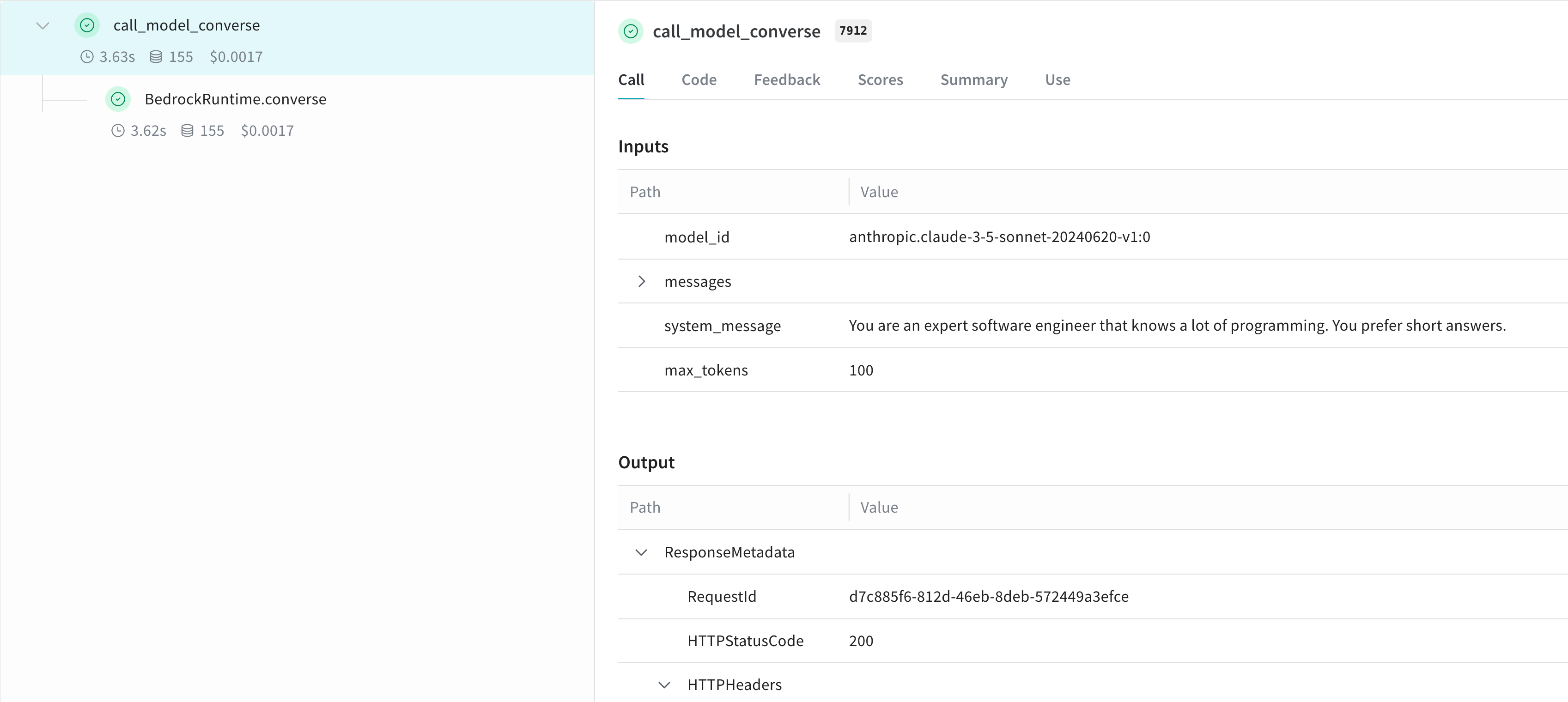
## より簡単に実験できるように `Model` を作成する
Weave Model を作成すると、実験を整理しやすくなり、パラメーターを保持できます。以下は `converse` API を使用した例です。
```python lines theme={null}
class BedrockLLM(weave.Model):
model_id: str
max_tokens: int = 100
system_message: str = "You are a helpful AI assistant."
@weave.op
def predict(self, prompt: str) -> str:
"Generate a response using Bedrock's converse API"
messages = [{
"role": "user",
"content": [{"text": prompt}]
}]
response = client.converse(
modelId=self.model_id,
system=[{"text": self.system_message}],
messages=messages,
inferenceConfig={"maxTokens": self.max_tokens},
)
return response["output"]["message"]["content"][0]["text"]
# モデルを作成して使用する
model = BedrockLLM(
model_id="anthropic.claude-3-5-sonnet-20240620-v1:0",
max_tokens=100,
system_message="You are an expert software engineer that knows a lot of programming. You prefer short answers."
)
result = model.predict("What is the best way to handle errors in Python?")
print(result)
```
この方法を使うと、実験をバージョン管理し、Bedrock ベースのアプリケーションの異なる設定を簡単にトラッキングできます。
## 詳しく見る
Amazon Bedrock を Weave で使用する方法について詳しく見る
### Weave Playground で Bedrock を試す
設定なしで Weave UI から Amazon Bedrock モデルを試したい場合は、[LLM Playground](../tools/playground) をお試しください。
### レポート: Weave で Bedrock 上の LLM をテキスト要約タスクで比較する
[Amazon Bedrock 上の LLM を評価する](https://wandb.ai/byyoung3/ML_NEWS3/reports/Compare-LLMs-on-Amazon-Bedrock-for-text-summarization-with-W-B-Weave--VmlldzoxMDI1MTIzNw) レポートでは、要約タスク向けに LLM を評価・比較するために、Bedrock と Weave を組み合わせて使う方法を、コードサンプル付きで説明しています。