> ## Documentation Index
> Fetch the complete documentation index at: https://wb-21fd5541-docs-hivemind-launch.mintlify.site/llms.txt
> Use this file to discover all available pages before exploring further.

# ローカルインスタンスで問題が発生した場合、どのファイルを確認すればよいですか？

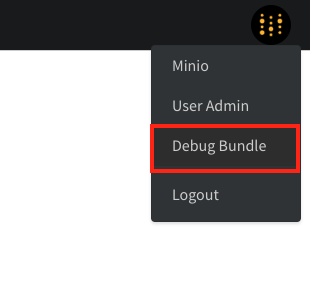
`Debug Bundle` を確認してください。管理者は、画面右上の W\&B アイコンを選択し、次に `Debug Bundle` を選ぶと、`/system-admin` ページから取得できます。
<Frame>
  <img src="https://mintcdn.com/wb-21fd5541-docs-hivemind-launch/R2JcDHqq5H9e7IgE/images/technical_faq/debug_bundle.png?fit=max&auto=format&n=R2JcDHqq5H9e7IgE&q=85&s=4908b9c16f298cd859720affec618bca" alt="Debug Bundle のダウンロード" width="310" height="302" data-path="images/technical_faq/debug_bundle.png" />
</Frame>

<Frame>
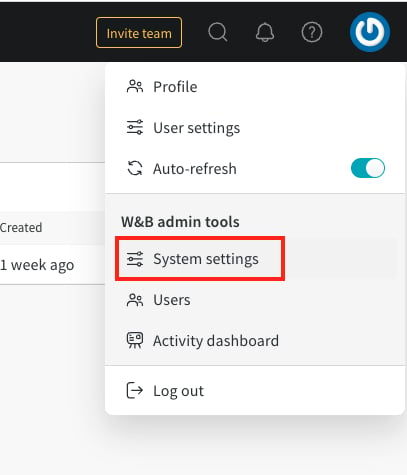
  <img src="https://mintcdn.com/wb-21fd5541-docs-hivemind-launch/R2JcDHqq5H9e7IgE/images/technical_faq/local_system_settings.png?fit=max&auto=format&n=R2JcDHqq5H9e7IgE&q=85&s=975c94b668d858fc65ab19fd068756b8" alt="システム設定" width="407" height="475" data-path="images/technical_faq/local_system_settings.png" />
</Frame>

***

<Badge stroke shape="pill" color="orange" size="md">[管理者](/ja/support/models/tags/administrator)</Badge>
