> ## Documentation Index
> Fetch the complete documentation index at: https://wb-21fd5541-docs-hivemind-launch.mintlify.site/llms.txt
> Use this file to discover all available pages before exploring further.

# DSPy

> Utilisez Weave pour suivre et consigner automatiquement les appels effectués avec les modules et fonctions DSPy

export const GitHubLink = ({url}) => <a href={url} target="_blank" rel="noopener noreferrer" className="github-source-link">
    <svg width="20" height="20" viewBox="0 0 24 24" fill="currentColor" xmlns="http://www.w3.org/2000/svg">
      <path d="M12 0C5.37 0 0 5.37 0 12c0 5.31 3.435 9.795 8.205 11.385.6.105.825-.255.825-.57 0-.285-.015-1.23-.015-2.235-3.015.555-3.795-.735-4.035-1.41-.135-.345-.72-1.41-1.23-1.695-.42-.225-1.02-.78-.015-.795.945-.015 1.62.87 1.845 1.23 1.08 1.815 2.805 1.305 3.495.99.105-.78.42-1.305.765-1.605-2.67-.3-5.46-1.335-5.46-5.925 0-1.305.465-2.385 1.23-3.225-.12-.3-.54-1.53.12-3.18 0 0 1.005-.315 3.3 1.23.96-.27 1.98-.405 3-.405s2.04.135 3 .405c2.295-1.56 3.3-1.23 3.3-1.23.66 1.65.24 2.88.12 3.18.765.84 1.23 1.905 1.23 3.225 0 4.605-2.805 5.625-5.475 5.925.435.375.81 1.095.81 2.22 0 1.605-.015 2.895-.015 3.3 0 .315.225.69.825.57A12.02 12.02 0 0024 12c0-6.63-5.37-12-12-12z" />
    </svg>
    Source GitHub
  </a>;

export const ColabLink = ({url}) => <a href={url} target="_blank" rel="noopener noreferrer" className="colab-link">
    <svg width="20" height="20" viewBox="0 0 24 24" fill="currentColor" xmlns="http://www.w3.org/2000/svg">
      <path d="M14.25.18l.9.2.73.26.59.3.45.32.34.34.25.34.16.33.1.3.04.26.02.2-.01.13V8.5l-.05.63-.13.55-.21.46-.26.38-.3.31-.33.25-.35.19-.35.14-.33.1-.3.07-.26.04-.21.02H8.77l-.69.05-.59.14-.5.22-.41.27-.33.32-.27.35-.2.36-.15.37-.1.35-.07.32-.04.27-.02.21v3.06H3.17l-.21-.03-.28-.07-.32-.12-.35-.18-.36-.26-.36-.36-.35-.46-.32-.59-.28-.73-.21-.88-.14-1.05-.05-1.23.06-1.22.16-1.04.24-.87.32-.71.36-.57.4-.44.42-.33.42-.24.4-.16.36-.1.32-.05.24-.01h.16l.06.01h8.16v-.83H6.18l-.01-2.75-.02-.37.05-.34.11-.31.17-.28.25-.26.31-.23.38-.2.44-.18.51-.15.58-.12.64-.1.71-.06.77-.04.84-.02 1.27.05zm-6.3 1.98l-.23.33-.08.41.08.41.23.34.33.22.41.09.41-.09.33-.22.23-.34.08-.41-.08-.41-.23-.33-.33-.22-.41-.09-.41.09zm13.09 3.95l.28.06.32.12.35.18.36.27.36.35.35.47.32.59.28.73.21.88.14 1.04.05 1.23-.06 1.23-.16 1.04-.24.86-.32.71-.36.57-.4.45-.42.33-.42.24-.4.16-.36.09-.32.05-.24.02-.16-.01h-8.22v.82h5.84l.01 2.76.02.36-.05.34-.11.31-.17.29-.25.25-.31.24-.38.2-.44.17-.51.15-.58.13-.64.09-.71.07-.77.04-.84.01-1.27-.04-1.07-.14-.9-.2-.73-.25-.59-.3-.45-.33-.34-.34-.25-.34-.16-.33-.1-.3-.04-.25-.02-.2.01-.13v-5.34l.05-.64.13-.54.21-.46.26-.38.3-.32.33-.24.35-.2.35-.14.33-.1.3-.06.26-.04.21-.02.13-.01h5.84l.69-.05.59-.14.5-.21.41-.28.33-.32.27-.35.2-.36.15-.36.1-.35.07-.32.04-.28.02-.21V6.07h2.09l.14.01.21.03zm-6.47 14.25l-.23.33-.08.41.08.41.23.33.33.23.41.08.41-.08.33-.23.23-.33.08-.41-.08-.41-.23-.33-.33-.23-.41-.08-.41.08z" />
    </svg>
    Essayer sur Colab
  </a>;

<div style={{ display: 'flex', gap: '12px', flexWrap: 'wrap' }}>
  <ColabLink url="https://colab.research.google.com/github/wandb/examples/blob/master/weave/docs/quickstart_dspy.ipynb" />

  <GitHubLink url="https://github.com/wandb/examples/blob/master/weave/docs/quickstart_dspy.ipynb" />
</div>

[DSPy](https://dspy.ai) est un framework permettant d’optimiser algorithmiquement les prompts et les poids des LM, en particulier lorsque les LM sont utilisés une ou plusieurs fois dans un pipeline. Weave suit et journalise automatiquement les appels effectués à l’aide des modules et fonctions DSPy.

<div id="tracing">
  ## Tracing
</div>

Il est important de stocker les traces des applications basées sur des modèles de langage dans un emplacement centralisé, à la fois pendant le développement et en Production. Ces traces peuvent être utiles pour le débogage, et constituer un jeu de données qui vous aidera à améliorer votre application.

Weave capturera automatiquement les traces de [DSPy](https://dspy.ai). Pour commencer à suivre, appelez `weave.init(project_name="<YOUR-WANDB-PROJECT-NAME>")` et utilisez la bibliothèque normalement.

```python lines theme={null}
import os
import dspy
import weave

os.environ["OPENAI_API_KEY"] = "<YOUR-OPENAI-API-KEY>"

weave.init(project_name="<YOUR-WANDB-PROJECT-NAME>")

lm = dspy.LM('openai/gpt-4o-mini')
dspy.configure(lm=lm)
classify = dspy.Predict("sentence -> sentiment")
classify(sentence="it's a charming and often affecting journey.")
```

[<img src="https://mintcdn.com/wb-21fd5541-docs-hivemind-launch/HbhUDAG_r2i2K_Pk/weave/guides/integrations/imgs/dspy/dspy_trace.png?fit=max&auto=format&n=HbhUDAG_r2i2K_Pk&q=85&s=746a298e29f96b5e4135f7128e559d16" alt="dspy_trace.png" width="2880" height="1800" data-path="weave/guides/integrations/imgs/dspy/dspy_trace.png" />](https://wandb.ai/geekyrakshit/dspy-project/weave/calls)

Weave journalise tous les appels au modèle de langage dans votre programme DSPy, avec des détails sur les entrées, les sorties et les métadonnées.

<div id="track-your-own-dspy-modules-and-signatures">
  ## Suivez vos propres modules et signatures DSPy
</div>

Un `Module` est l’élément de base d’un programme DSPy, avec des paramètres entraînables, qui encapsule une technique de prompting. Une `Signature` est une spécification déclarative du comportement en entrée/sortie d’un module DSPy. Weave suit automatiquement toutes les `Signatures` et tous les `Modules` intégrés et personnalisés dans vos programmes DSPy.

```python lines theme={null}
import os
import dspy
import weave

os.environ["OPENAI_API_KEY"] = "<YOUR-OPENAI-API-KEY>"

weave.init(project_name="<YOUR-WANDB-PROJECT-NAME>")

class Outline(dspy.Signature):
    """Outline a thorough overview of a topic."""

    topic: str = dspy.InputField()
    title: str = dspy.OutputField()
    sections: list[str] = dspy.OutputField()
    section_subheadings: dict[str, list[str]] = dspy.OutputField(
        desc="mapping from section headings to subheadings"
    )


class DraftSection(dspy.Signature):
    """Draft a top-level section of an article."""

    topic: str = dspy.InputField()
    section_heading: str = dspy.InputField()
    section_subheadings: list[str] = dspy.InputField()
    content: str = dspy.OutputField(desc="markdown-formatted section")


class DraftArticle(dspy.Module):
    def __init__(self):
        self.build_outline = dspy.ChainOfThought(Outline)
        self.draft_section = dspy.ChainOfThought(DraftSection)

    def forward(self, topic):
        outline = self.build_outline(topic=topic)
        sections = []
        for heading, subheadings in outline.section_subheadings.items():
            section, subheadings = (
                f"## {heading}",
                [f"### {subheading}" for subheading in subheadings],
            )
            section = self.draft_section(
                topic=outline.title,
                section_heading=section,
                section_subheadings=subheadings,
            )
            sections.append(section.content)
        return dspy.Prediction(title=outline.title, sections=sections)


draft_article = DraftArticle()
article = draft_article(topic="World Cup 2002")
```

[<img src="https://mintcdn.com/wb-21fd5541-docs-hivemind-launch/HbhUDAG_r2i2K_Pk/weave/guides/integrations/imgs/dspy/dspy_custom_module.png?fit=max&auto=format&n=HbhUDAG_r2i2K_Pk&q=85&s=9599b15cf3817568b983dfae1eb431c3" alt="Trace d’un module DSPy personnalisé dans Weave, avec le flux d’exécution du module et les détails de la trace" width="3456" height="1864" data-path="weave/guides/integrations/imgs/dspy/dspy_custom_module.png" />](https://wandb.ai/geekyrakshit/dspy-project/weave/calls)

<div id="optimization-and-evaluation-of-your-dspy-program">
  ## Optimisation et évaluation de votre programme DSPy
</div>

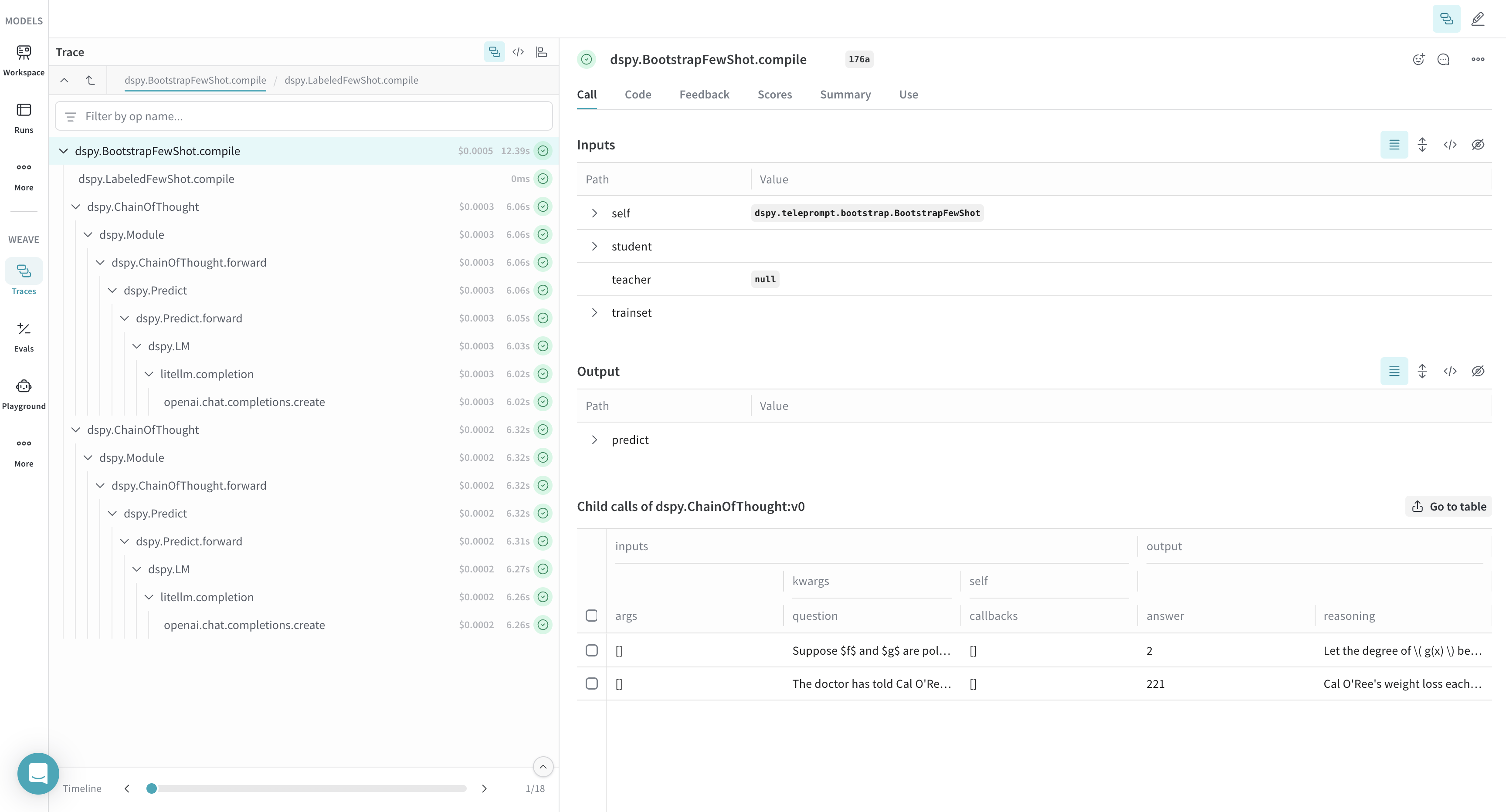
Weave capture aussi automatiquement les traces des optimiseurs DSPy et des appels d’Évaluation, que vous pouvez utiliser pour améliorer et évaluer les performances de votre programme DSPy sur un jeu de développement.

```python lines theme={null}
import os
import dspy
import weave

os.environ["OPENAI_API_KEY"] = "<YOUR-OPENAI-API-KEY>"
weave.init(project_name="<YOUR-WANDB-PROJECT-NAME>")

def accuracy_metric(answer, output, trace=None):
    predicted_answer = output["answer"].lower()
    return answer["answer"].lower() == predicted_answer

module = dspy.ChainOfThought("question -> answer: str, explanation: str")
optimizer = dspy.BootstrapFewShot(metric=accuracy_metric)
optimized_module = optimizer.compile(
    module, trainset=SAMPLE_EVAL_DATASET, valset=SAMPLE_EVAL_DATASET
)
```

[<img src="https://mintcdn.com/wb-21fd5541-docs-hivemind-launch/HbhUDAG_r2i2K_Pk/weave/guides/integrations/imgs/dspy/dspy_optimizer.png?fit=max&auto=format&n=HbhUDAG_r2i2K_Pk&q=85&s=20aeb06df86051df72a017bd738adcd0" alt="Trace de l’optimiseur DSPy dans Weave, avec le processus d’optimisation et les améliorations des performances" width="3456" height="1864" data-path="weave/guides/integrations/imgs/dspy/dspy_optimizer.png" />](https://wandb.ai/geekyrakshit/dspy-project/weave/calls)
